Wolf Revolution + Tutorial + Fly + Return + Callsing + Mode
version 12.06.08
Auto Injection
Windows XP (32Bit)
Windows 7 (64Bit)
warning:
Only works and if tested on Windows XP 32bit and windows 7 64bit, otherwise I have no operating system that is as sure to have the same use.
The trainer is 100% hotkey, you just need to know to correctly use hotkeys to have the hacks that are delivered in this release.
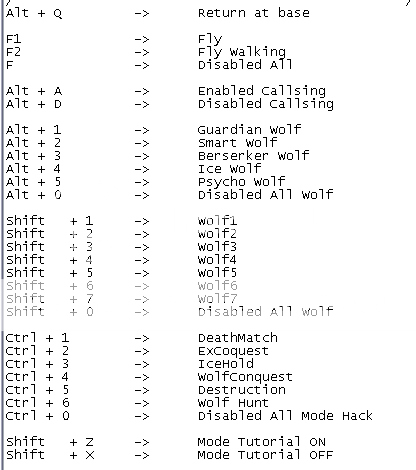
Instructions
Tutorial
Activate the use Tutorial Mode in the list of rooms, for which it then may enter any room and will have the full features you have in the Tutorial mode.
קוד:
Shift     + Z    ->     Mode Tutorial ON
Shift     + X    ->     Mode Tutorial OFF
Change Mode
Deathmatch: revivir las veces que quieras en modo ice Hold tener lobos y humanos en rojo en cazeria
EX-conquets: tener lobos y humanos ejemplo; Guardian con 850 HP
PD: activar estos hacks en el lobby si lo activas en el juego no funcionaran correctamente
קוד:
Ctrl + 1    ->    DeathMatch
Ctrl + 2    ->    ExCoquest
Ctrl + 3    ->    IceHold
Ctrl + 4    ->    WolfConquest
Ctrl + 5    ->    Destruction
Ctrl + 6    ->    Wolf Hunt
Ctrl + 0    ->    Disabled All Mode Hack
Callsing (Change Name): The mode of use is prior to entering the server, and when I activate appears the box where it says to enter your users off.
קוד:
Alt + A ->     Enabled Callsing
Alt + D ->    Disabled Callsing
Return at Base (Q): With the key (Q), then click again to oppress based to choose weapons and restores all your blood and does not count as death.
קוד:
Alt + Q -> Return at base
Wolf: Enables the use of special wolves, deberas use it on the right side of the room.
קוד:
Alt + 1        ->    Guardian Wolf
Alt + 2        ->    Smart Wolf
Alt + 3        ->    Berserker Wolf
Alt + 4        ->    Ice Wolf
Alt + 5        ->    Psycho Wolf
Alt + 0        ->    Disabled All Wolf
Special WOLFS Revolution:
קוד:
Shift     + 1    ->     Wolf1
Shift     + 2    ->     Wolf2
Shift     + 3     ->     Wolf3
Shift     + 4     ->     Wolf4
Shift     + 5    ->     Wolf5
Shift    + 6     ->     Wolf6
Shift     + 7     ->     Wolf7
Shift     + 0    ->    Disabled All Wolf



With Hotkeys can enable or disable the hack.
F1 : Enabled Fly Hack.
F2 : Enabled Fly Wall Hack (You fly from walls).
F : Disabled Fly y Fly Wall Hack (You fly from walls).
קוד:
instructions:
-------------


1) Implement the GunJect eye only works on WindowsXP 32Bit
2) After passing the clicks, then windows.
3) Do not close the window, just enter the Wolf and activate the hotkeys to use.
4) And that's it that easy.
When finished making 4 clicks respective, they appear when you press "continue", the window which is newly must log in WolfTeam.






 wolfTeam ה
 ציטוט ההודעה
