






 Remote Desktop Manager Enterprise Edition 5.4
Remote Desktop Manager Enterprise Edition 5.4
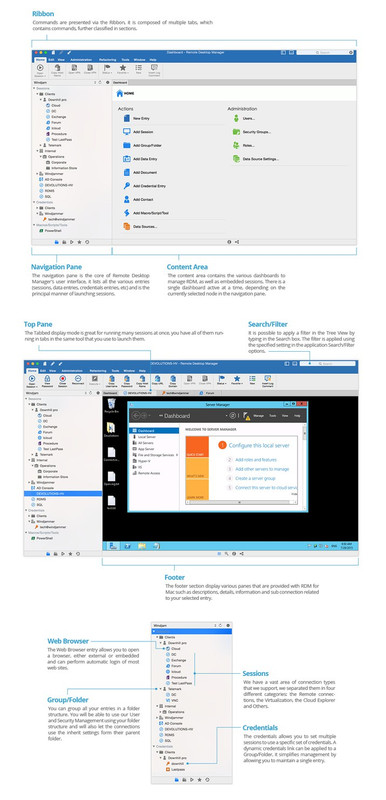
Download Links:קוד:Name: RemoteDesktopMngr54[kg][AMPED].zip Size 133.9 MB Remote Desktop Manager Enterprise Edition 5.4 macOS Remote Desktop Manager � is a small application to control the remote connection. With Remote Desktop Manager program, you can add, edit, delete, organize or find your remote connection quickly. The utility is compatible with the Microsoft Remote Desktop or Terminal Services, is a very simple to use, but at the same time is powerful and effective. Remote Desktop Manager is suitable for any user. Remote Connections Connect any session type, such as: RDP, SSH, Web, VNC, Telnet, Apple Remote Desktop, TeamViewer, LogMeIn and many more Increase productivity and efficiency with all the integrated applications Securely connect to more than multiple VPN types Password Management Save and manage all your passwords Input credentials and automatically login everywhere Import or integrate existing password managers, such as 1Password and many more Documents & Information Protect sensitive data, such as credit card numbers, serial numbers and bank accounts Store, share and link documents and contacts Create templates to simplify management TeamTeam Solution Share and centralize all of your connections and passwords within the organization Access your data when offline Manage and restrict user access View connection logs and track all remote access details Security Secure the organization via the best encryption algorithm Generate strong passwords and identify weak passwords U.S. federal government approved encryption User Interface & Organization Intuitive interface for all types of users Easy to deploy and use in an Enterprise environment No extensive training required Requires: Intel Mac OS X 10.8 or later. Web Site: http://mac.remotedesktopmanager.com What�s New in Remote Desktop Manager Enterprise Edition 5.4 New features: Added Google Drive data source Improvements: Added �Always prompt with list� option in Passward Vault Manager credential entry Added �Auto focus tab on item select� option Added �Auto select item on tab focus� option Added Mac/Unix environment variables section in the View Variables window Added Verbose and Log options in SSH Tunnel and SSH Port Forward entries Fixes: Fixed ARD session with �Scaled display� enabled not showing the view of the remote screen before resizing RDM window Fixed ARD/VNC/IntelAMD sessions shown as connected even if the connection process was canceled (e.g. when prompt for credentials) Fixed crash if SSH Shell session Scrollback values is set lower than the terminal height Fixed Favorites entries not being ordered alphabetically Fixed issues with sorting and filtering in Password List entry Fixed mouse wheel and trackpad scrolling not working in nonscaled ARD sessions Fixed random connection failure when launching RDP Modern Engine sessions Fixed RDP entries with Modern Engine randomly failing to connect when launched Fixed Web based 1Password entries not working with most recent version of 1Password cloud Fixed wrong window indexes used in Cisco AnyConnect VPN entry script (added properties for said indexes)
קוד:https://filejoker.net/h38ss6pit5d9/RemoteDesktopMngr54[kg][AMPED].zip

 ציטוט ההודעה
