






 xSecuritas Secure PC 2.1.0.4 Multilingual
Languages: Multilingual | File Size: 30.32 MB
Do you want to hide your important files from anyone else?
Want to hide all your documents on your desktop, my documents? Secure PC - Folder protection , Restrict use of specified programs , Create Encrypted Drive , Delete files permanently and Restricted use of external devices.
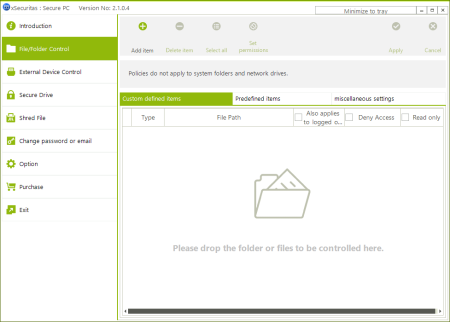
- You can set a policy such as deny-access (deny read/write/execute) or read-only for a specific drives, folders, files or defined extensions.
- For convenient control, we have already set the policy to control the desktop, my documents, office files, image files and etc.
- You can enable the desired policy.
- Caution : System related folders (Windows, Program Files, etc.) are not controlled for smooth execution of Window.
- You can prevents the specified application from running.
- For convenient control, we have already set a policy to control the execution of Web Browsers, etc. You can enable the desired policy.
- The policy is applied even if the main program is not running.
- For your convenience we offer many policies in advance.
You can set whether or not to apply the policy according to the user logon status.
- If you do not log on, no one knows what documents are on your PC.
- If you do not log on, no one can run the program on your PC.
- If you do not log on, no one can change the document on your PC.
- You can disable USB storage device or set as read-only
- You can disable portable storage device or set as read-only (like android mobile phone or camera)
- You can hide CD/DVD device or set as read-only
- The policy is applied even if the main program is not running.
- You can disable iPhone or iPad device
- You can disable Printer, Bluetooth device
- You can create multiple encrypted secure drives.
- Secure drives can be used in read-only or edit mode.
- Secure drives can be freely used like regular drives.
- Secure drives can only be used in the Log On state.
- Even if you replace the PC, you can still use the secure drive.
- Keep important files on your secure drive.
- You can permanently delete selected files / folders making them unrecoverable
- Files in the Recycle Bin can be permanently deleted making them unrecoverable.
- You can permanently delete files that can be recovered from within the drive.
- When booting the PC, the program will run as Log Off Mode and the program will be located in the Tray Bar.
- Even if you are running in Log On Mode, if you do not use your mouse or keyboard for a certain period of time, it will automatically switch to Log Off Mode.
- The program can be executed in stealth mode.
- Windows 7 32/64 bit
- Windows 8, 8.1 32/64 bit
- Windows 10 32/64 bit
- Windows Server 2008 R2 or later
DOWNLOAD
uploadgig
rapidgatorקוד:https://uploadgig.com/file/download/F6c6625F9fb9F6aD/u0qy61p5_.Secure.PC.2.1.0.4.rar
nitroflareקוד:https://rapidgator.net/file/5ffff5327623f51a0dbb4d7a623d5572/u0qy61p5_.Secure.PC.2.1.0.4.rar
קוד:http://nitroflare.com/view/9C14A0A314B5DF9/u0qy61p5_.Secure.PC.2.1.0.4.rar
 ציטוט ההודעה
