






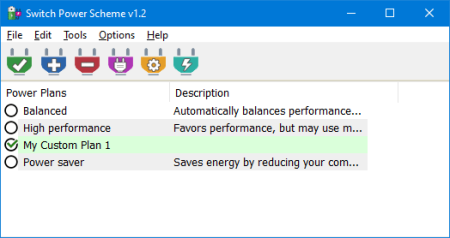
 Switch Power Scheme 1.2
File Size : 0.9 Mb
Switching power plans require you to open Power Options applet from Control Panel or from Windows Settings app.
In the Power Options applet, you can choose one of the three options - Balanced, High performance and Power saver, or you can create your own custom plans.
1. You can choose "High Performance" power plan to increase FPS while playing a Game
2. When the laptop battery is low , You can switch to the "power saver" plan and make the battery last longer.
3. In summer, you can create your own power plan to reduce the CPU frequency and avoid the laptop from getting hot.
4. You can create a special plan to prevent the computer from going to sleep during the .
There are Lots of methods to switch power plans , for example ; Right Click battery icon in task-bar - Choose Power Options - Choose One of the suitable power Plan or You can use Windows Mobility Center and choose the power plan you wish to use under Battery Status. You can also use command prompt or powershell. Switching power plans multiple s a day is consuming. We have created a small Portable free Application "Switch Power Scheme" to simplify the whole process.
DOWNLOAD
uploadgig
rapidgatorקוד:https://uploadgig.com/file/download/94cA523D4eAaf92e/MSiEiQpr_SwitchPower.rar
nitroflareקוד:https://rapidgator.net/file/21a2bb6a86bd71c1cb947cc35d97d935/MSiEiQpr_SwitchPower.rar
קוד:http://nitroflare.com/view/641AB800407EAC2/MSiEiQpr_SwitchPower.rar
 ציטוט ההודעה
