






 Native Instruments Massive X Factory Library 1.3.0.1
File size: 97 MB
Massive X is Native Instruments' new flagship synth, built by the same team as its predecessor.
Based on a state of the art architecture, it delivers pristine sound, and huge creative flexibility for artists and sound designers alike - allowing them to create, modulate, and experiment with sound from a huge range of sources, in any way they like.
THE OSCILLATORS
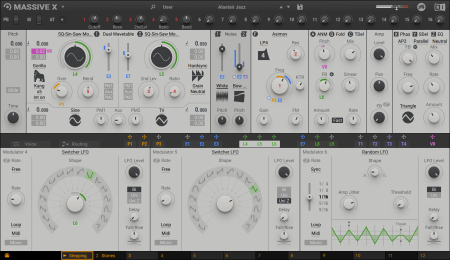
At the heart of MASSIVE X you'll find the completely new oscillator section - capable of producing more variation than some entire synths, right at the source. Choose from over 170 wavetables and 10 different modes of reading them - from the aggressive Gorilla family, to a wavetable-bending mode, Hardsync, Formant, and many more - each with their own unique sub-modes and additional controls. Dial in two phase-modulation oscillators to inject extra movement into the main oscillators.
ROUTING REIMAGINED
Connect any output to any input, and see what happens. The intuitive routing setup lets you essentially rewire parts of MASSIVE X, meaning you can bypass, feedback, and send audio any way you like. It's also possible to route modulators as audio sources to excite elements such as the comb filter.
PERFORMERS: MADE TO MODULATE
Draw precise patterns of modulation in the Performer section, and assign them to parameters for complex, evolving patches, or for controlled changes to your sound. You can then use the Remote Octave control to trigger them on your keyboard, meaning you get truly playable modulation and huge expressive variety within a single patch.
ADDED A scrollbar is now visible to the right when scrolling through menu categories if they exceed the menu size
ADDED A scrollbar is now available for scrolling through the content result list in context menus
IMPROVED Parameter Readouts: Anima Rate, Flanger Time, SVF Parallel/Serial Bandwidth, Chorus/Phaser/Flanger Rate, WT OSC Standard mode Phase control, Chorus Time L1/2 R1/2 in manual mode, Comb AP Freq/LP Freq in Fix Mode
IMPROVED Smoother-looking modulation rings for big parameter knobs
CHANGED User presets are now saved in a dedicated 'Presets' subfolder in the user content directory
FIXED Dropping a preset onto the Massive X GUI loads the preset only in this instance
FIXED Various issues with text input fields
FIXED The Start/Phase knob on the Noise Player keeps correct values when the mode is changed while a macro is assigned to it
FIXED VST Massive X GUI is displayed correctly in Maschine Plug-in Strip in Mix View when Maschine is hosted
FIXED Menus with icons open when the icon is clicked
FIXED Readouts for Stereo Delay's Time parameter are displayed correctly
KNOWN ISSUE FL Studio 20.5 VST: when loading a preset the interface will shrink. Fix: update to FL Studio 20.6 or higher
WiN/OSX
DOWNLOAD
uploadgig
rapidgatorקוד:https://uploadgig.com/file/download/8402d8cb4c9ee681/pKa3WXsY_Native.Inst.rar
nitroflareקוד:https://rapidgator.net/file/812741cd44cf42bb1fe3e58c8774b074/pKa3WXsY_Native.Inst.rar.html
קוד:http://nitroflare.com/view/F6EDCDDD8BF53D8/pKa3WXsY_Native.Inst.rar
 ציטוט ההודעה
