






 OneNoteGem Mind Map for OneNote 2021 v11.2.0.71
File size: 5.9 MB
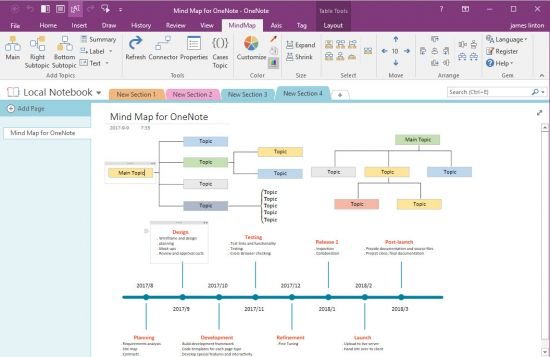
Using native elements to create Mind Map in OneNote 2021, 2016, 2013, 2010. Time Axis, All OneNote 138 Tags.
Add Main Topic
Insert a Main Topic into current OneNote page.
Put the cursor in OneNote page, click on this "Main" feature to insert a main topic in cursor position.
Add Right Subtopic
Insert a Subtopic on right side of the selected topic.
Select a topic at first, then click on "Right Subtopic" to insert a subtopic on right side of the selected topic.
Add Bottom Subtopic
Insert a Subtopic at bottom of the selected topic.
Select a topic at first, then click on "Bottom Subtopic" to insert a subtopic at bottom of the selected topic.
Vertical Text
Display vertical topic text. Select a topic, click this feature to change the text to vertical text.(Use for branch topic)
Horizontal Text
Display horizontal topic text. If the selected topic text is vertical text, you can use this feature change the text to horizontal text.
Whats New
HOMEPAGEקוד:https://www.onenotegem.com/a/release/mind-map-for-onenote.html
קוד:https://www.onenotegem.com/a/addins/mind-map-for-onenote.html
Download From Rapidgator
Download From Nitroflareקוד:קוד:https://rapidgator.net/file/679fae41751a5736ac6070b7c0d1c28b
קוד:קוד:https://nitroflare.com/view/B68B75F9D8C3A3D

 ציטוט ההודעה
