Welcome to the FrapsTM website!
Fraps is a universal Windows application that can be used with games using DirectX or OpenGL graphic technology. In its current form Fraps performs many tasks and can best be described as:
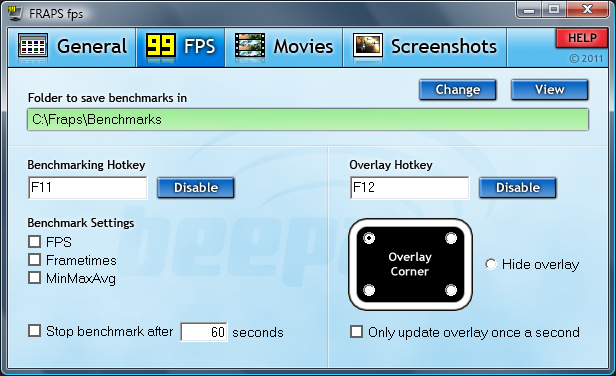
Benchmarking Software - Show how many Frames Per Second (FPS) you are getting in a corner of your screen. Perform custom benchmarks and measure the frame rate between any two points. Save the statistics out to disk and use them for your own reviews and applications.
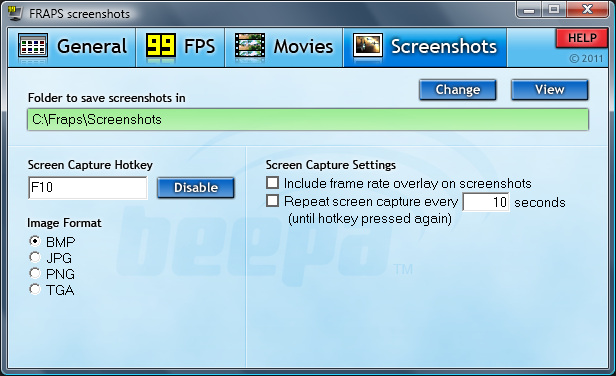
Screen Capture Software - Take a screenshot with the press of a key! There's no need to paste into a paint program every time you want a new shot. Your screen captures are automatically named and timestamped.
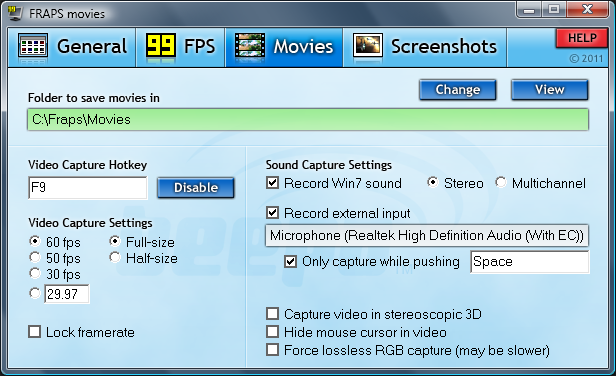
Realtime Video Capture Software - Have you ever wanted to record video while playing your favourite game? Come join the Machinima revolution! Throw away the VCR, forget about using a DV cam, game recording has never been this easy! Fraps can capture audio and video up to 7680x4800 with custom frame rates from 1 to 120 frames per second!
Changelog
Fraps 3.5.99 - 26th February, 2013
- Fixed counter not appearing in Aero desktop (DWM) and DX10 games after latest Windows Update
Fraps 3.5.9 - 30th August, 2012
- Fixed crash when initiating loop recording
- Fixed periodic stutter for some users during loop recording
Fraps 3.5.8 - 22nd August, 2012
- Fixed intermittent crash recording from OpenGL games
- Fixed crash when unable to access sound device
- Fixed minor memory leak with Win7/Vista sound recording
- Fixed crash encountered by some users when ending a recording
Fraps 3.5.7 - 14th August, 2012
- Fixed audio sync in long recordings for Windows XP users
- Fixed problem taking screenshots from DWM even with counter on screen
- Fixed 64-bit DirectX 11 games always being recorded in lossless RGB
- Fixed corruption in video when audio source set to 11.25kHz
- Other minor bug fixes
Fraps 3.5.6 - 21st July, 2012
- Fixed microphone drifting out of sync in long recordings under Windows 7 & Vista
- Fixed clipping with audio sources greater than 8 channels
- Fixed audio from mono USB devices only appearing in left channel
- Reduced latency of capture from external inputs
Fraps 3.5.5 - 12th June, 2012
- Fixed black borders captured around GameMaker based games
- Fixed crash in D3D10/11 video recording with 64-bit applications
- Fixed scrambled colors saved with some 10-bit color modes
Fraps 3.5.4 - 30th May, 2012
- Improved capture speed for D3D8 games
- Fixed Max Payne 1 not recording when AA enabled
- Fixed error when initializing DirectX on Windows 7
Fraps 3.5.3 - 27th May, 2012
- Fixed micro-stutter in recorded video after temporary framerate drop
- Fixed missing video frames in some games after rendering paused
- Fixed bug causing error message on startup for some users
Fraps 3.5.2 - 20th May 2012
- Fixed missing audio at end of long recordings
- Fixed error preventing movie playback in Windows Media Player
- Fixed screen freezing when starting video capture in Minecraft & other OpenGL games
- Fixed crash during video mode switch in DosBox
Fraps 3.5.1 - 18th May 2012
- Added support for exFAT drives writing larger than 4 Gigabytes
- Fixed crash when large custom resolutions used in game
Fraps 3.5.0 - 26th April 2012
- Support for large AVI movie files (above 4 Gigabytes) on NTFS drives
- Added option to split AVIs at 4 Gigabytes for legacy AVI 1.0 support
- Fixed loop recording using large amounts of disk space for short clips
- Fixed benchmark logs not being saved if game was quit before benchmark ended
- Fixed View folder not opening window on some machines
- NEW MINIMUM SYSTEM REQUIREMENTS: CPU with SSE2 required (Pentium 4 & above)
- Windows 2000 is no longer supported (Windows XP & above)
22nd October 2011 - Fraps 3.4.7 Released
The latest version of Fraps includes an update to the loop recording mode, allowing you to specify a custom length for the buffer (rather than the default 30 seconds). To activate the recording loop simply press and hold your video capture hotkey until the Fraps counter turns pink, indicating that loop recording has begun.
We have also included new optimizations for recording at high resolutions such as 1920x1080 (1080P). Performance gains should be seen in most OpenGL and DirectX games with Fraps 3.4.
Changelog
Fraps 3.4.7 - 22nd October 2011
- Fixed recording rate being locked to a low multiple when Vsync enabled
- Fixed unlocked recording speed after temporary slowdowns
- Fixed Alt key interference with VMware/remote desktop applications
Fraps 3.4.6 - 31st July 2011
- Fixed overlay color in Fear 3
- Fixed detection of IL2: Cliffs of Dover and Bloodline Champions
- Fixed counter appearing in Thunderbird and Pale Moon applications
- Other minor bug fixes
Fraps 3.4.5 - 28th May 2011
- Fixed some videos being recorded with scrambled colors
Fraps 3.4.4 - 26th May 2011
- Increased performance capturing Vista/Windows 7 aero desktop (DWM)
- Reduced memory footprint of Fraps process
- Fixed Fraps crash while idling on desktop
- Fixed gem glowing while recording The Dark Mod
- Fixed hotkeys not responding when simulated from autohotkey/macro apps
- Fixed graphic corruption in some OpenGL titles
Fraps 3.4.3 - 12th May 2011
- Improved DirectDraw capture speed
- Fixed recording crash on single CPU systems
- Fixed invalid colors/crashing recording from 16-bit color games
- Fixed corrupt/oversized AVIs being written at high resolutions
- Fixed Dirt not loading with Fraps running
- Other minor bug fixes and optimizations
Fraps 3.4.2 - 14th Apr 2011
- Improved OpenGL capture speed
- Fixed freeze when clicking on Minimize button
- Fixed GL state not being restored properly
- Fixed blank video showing in some AVIs
Fraps 3.4.1 - 2nd Apr 2011
- Fixed crash when starting Fraps for some users
- Fixed hotkeys not being detected when modifier keys held
- Fixed keys getting stuck when used by both the game and Fraps
Fraps 3.4.0 - 29th Mar 2011
- Added configurable buffer size for loop recording mode
- Increased video capture performance at high resolutions
- Fixed slow recording of Minecraft at default window size
- Fixed benchmark crashing when configured to stop automatically after 1 second
מוזמנים אליי לפרופיל בנתיים 13/5/2013 15 תוכנות מעולות






 FRAPS|הסרטת מסך בכל מצב(גם תוך כדי משחק)|התוכנה הכי טובה ומוכרת!
צעירה פורצת למגרש במהלך משחק. בתחתונים וחזייה




 ציטוט ההודעה
